
industrial robotics company
Human machine interface re-design
About
Create a user interface that is intuitive and reduces initial operator training.
Role
Senior user interface designer.
Skills
Information architecture, accessibility, branding, and high-fidelity mockups.

Problem
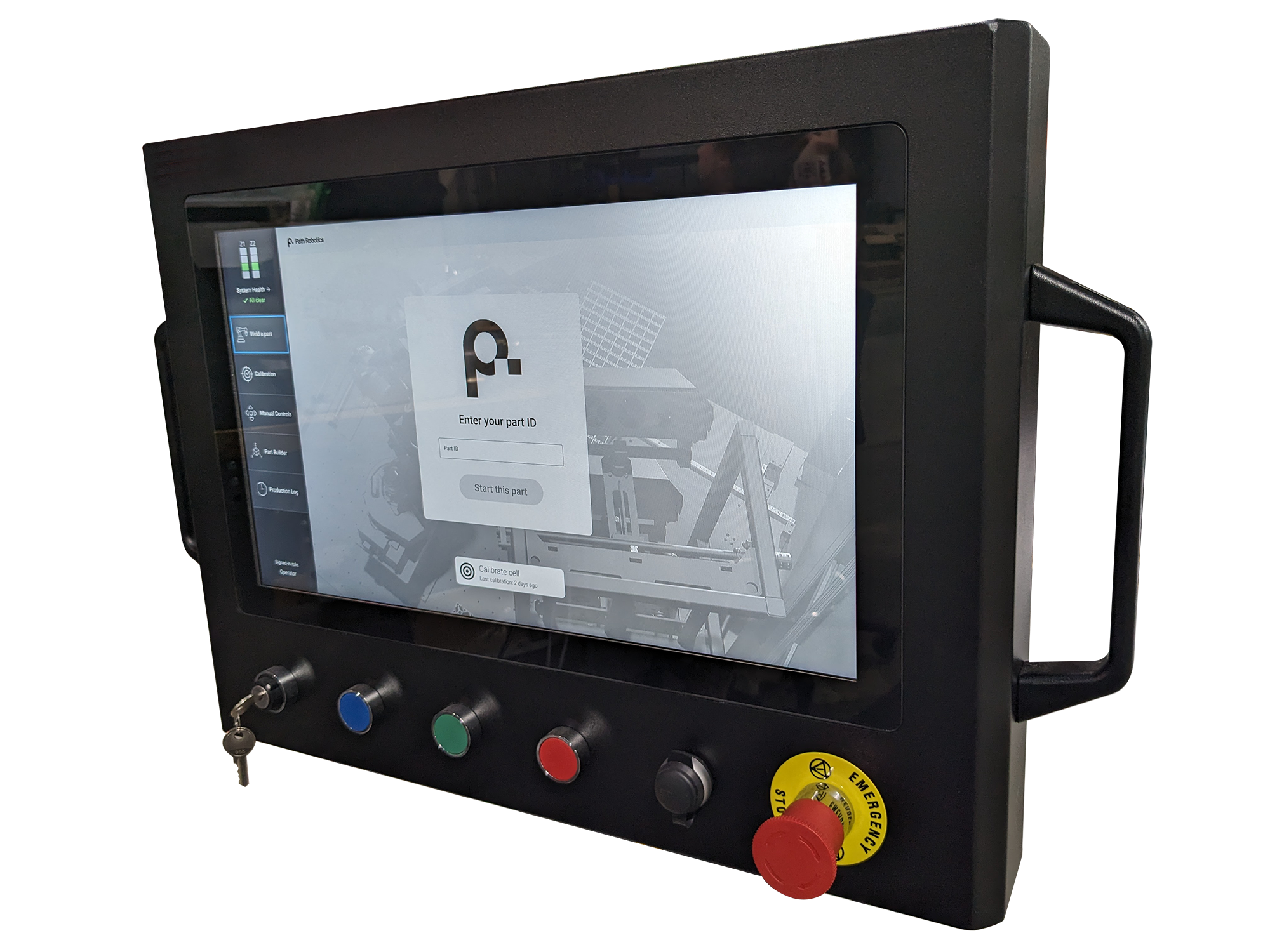
The initial design of the human-machine interface (HMI) was to provide a straightforward touch-based system that enabled the operator to initiate tasks, leave the workstation, and come back upon completion.
However, as the tool's functionalities grew, the foundational objective was lost. Training duration to master the interface has surged to the point where it necessitates advanced engineers for operation. There was a pressing need to develop a user interface that is user-friendly and diminishes the need for extensive initial training.
Before
Solution
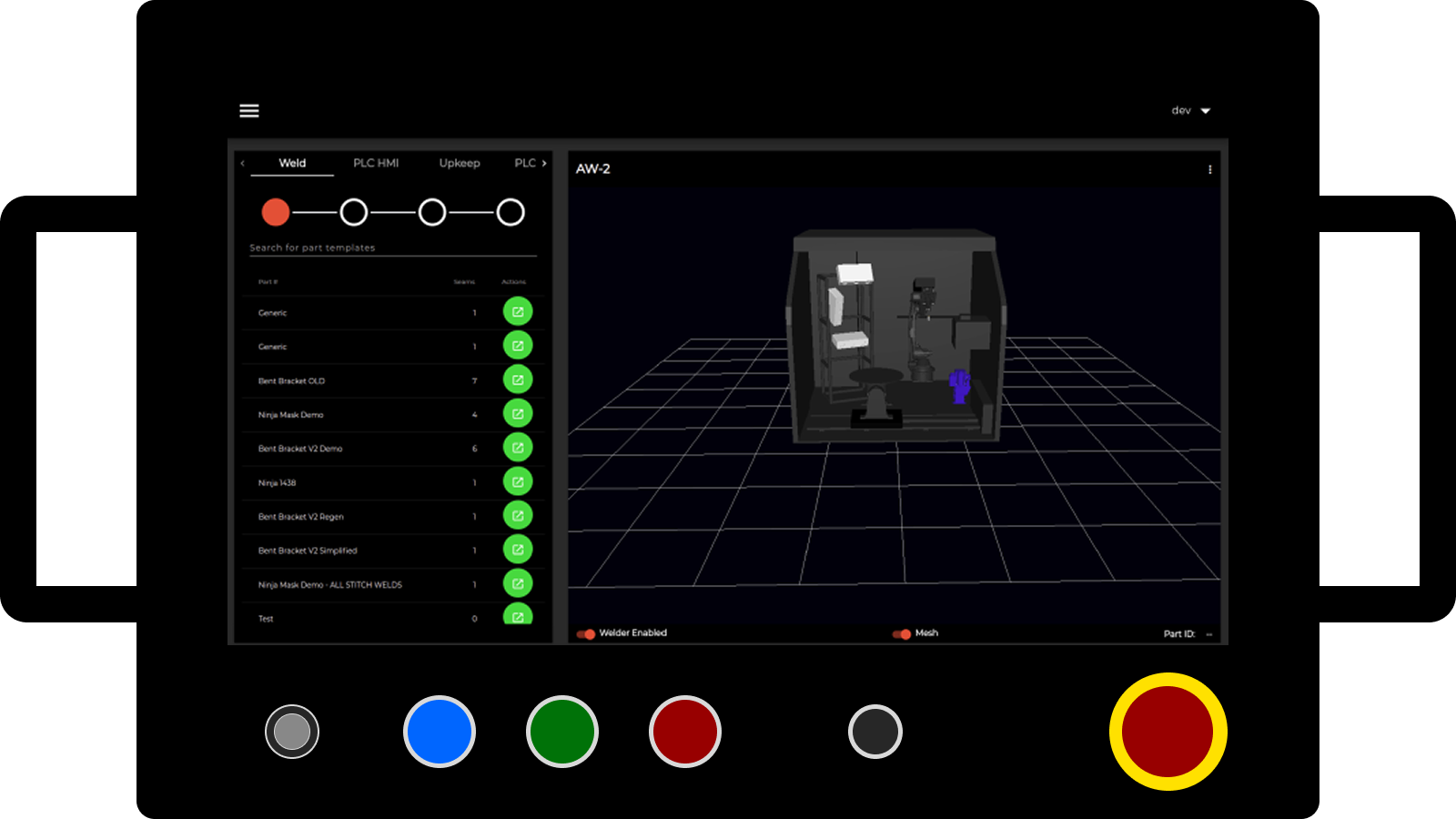
The platform features an intuitive user interface designed to minimize the need for extensive operator training and streamline ramp-up processes, effectively reducing reliance on legacy systems. With touch-enabled functionality and an accessible, all-inclusive design, the interface ensures ease of use for a wide range of users. Additionally, the tool is built to be both expandable and scalable, accommodating future growth and evolving operational needs.
After
solution
Design System Creation
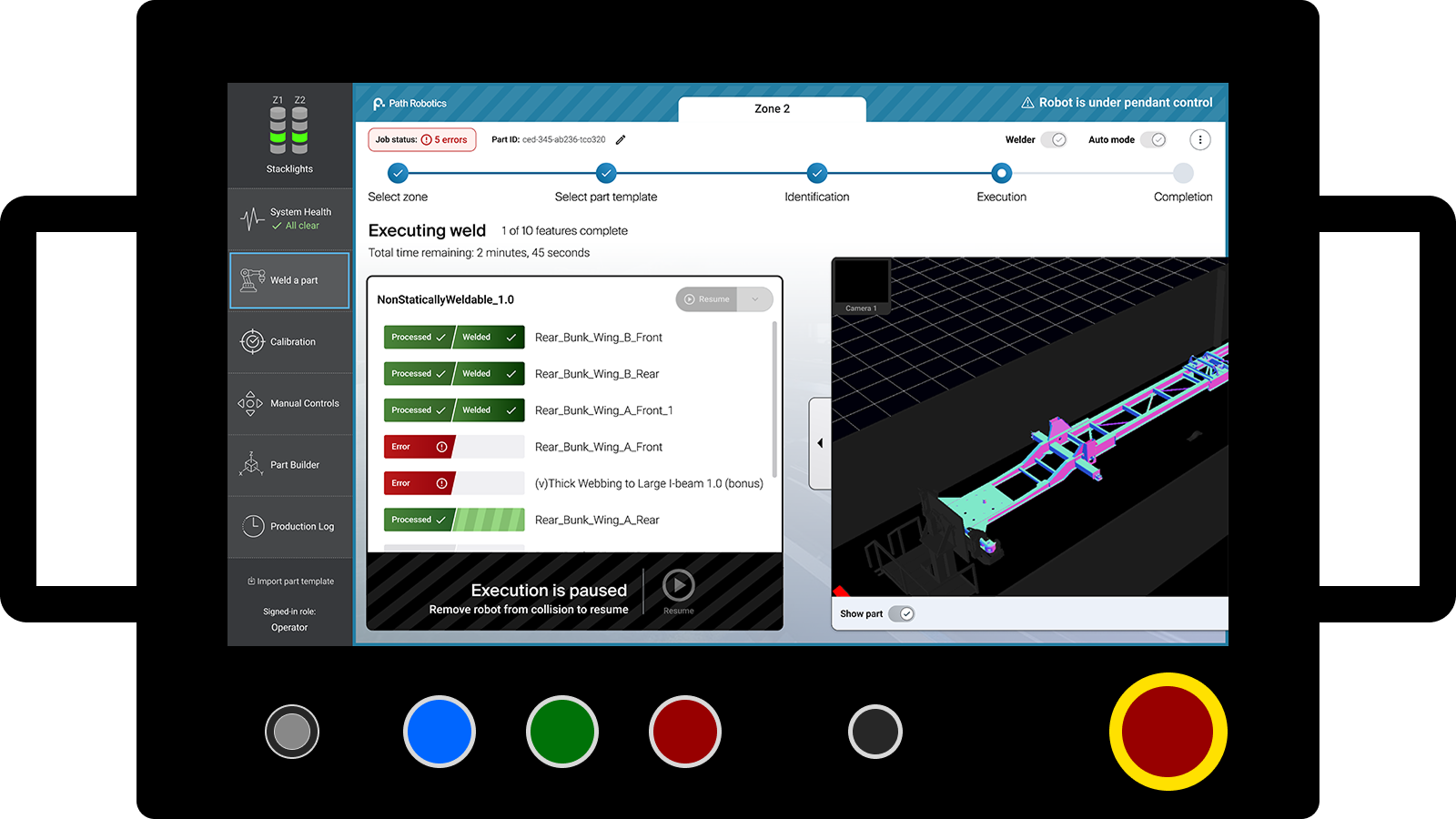
Creating a design system provided a consistent and scalable foundation for the human machine interface, ensuring that all UI elements followed clear standards and patterns. This consistency made the interface more predictable for operators, reinforcing usability and reducing cognitive load. It also streamlined collaboration between design and development, enabling faster iteration and more efficient implementation while maintaining a high level of quality across the system.
solution
Improved Navigation
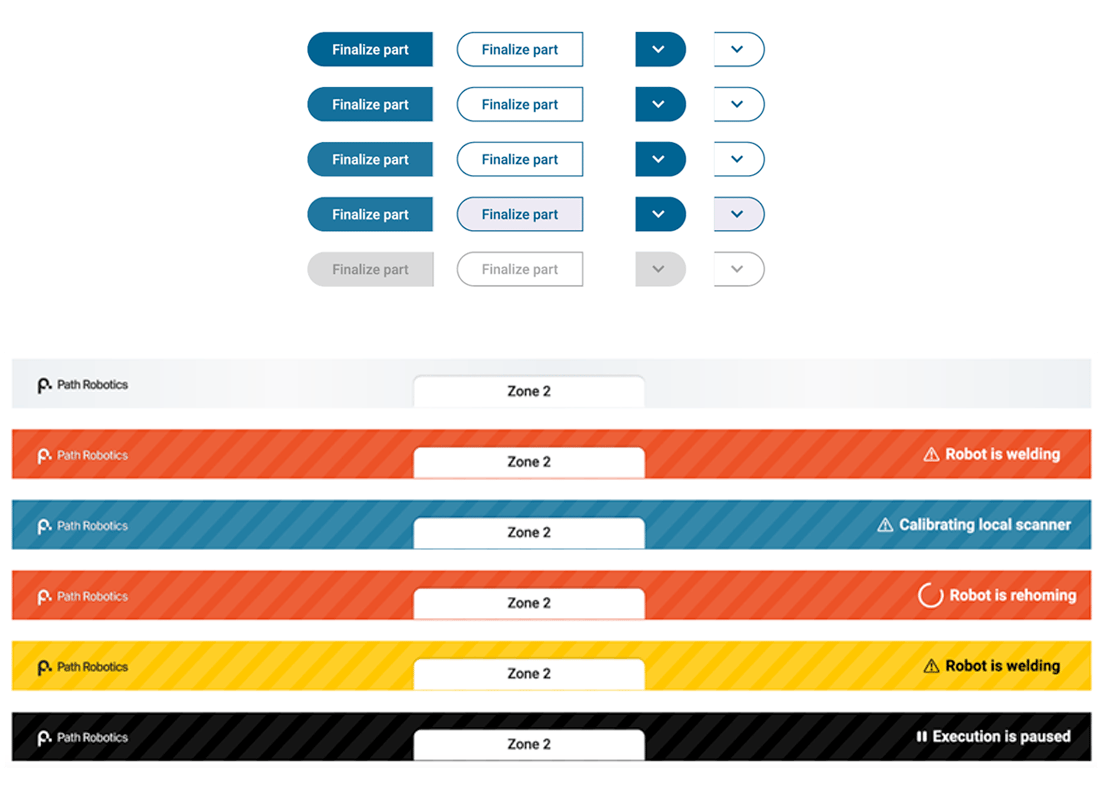
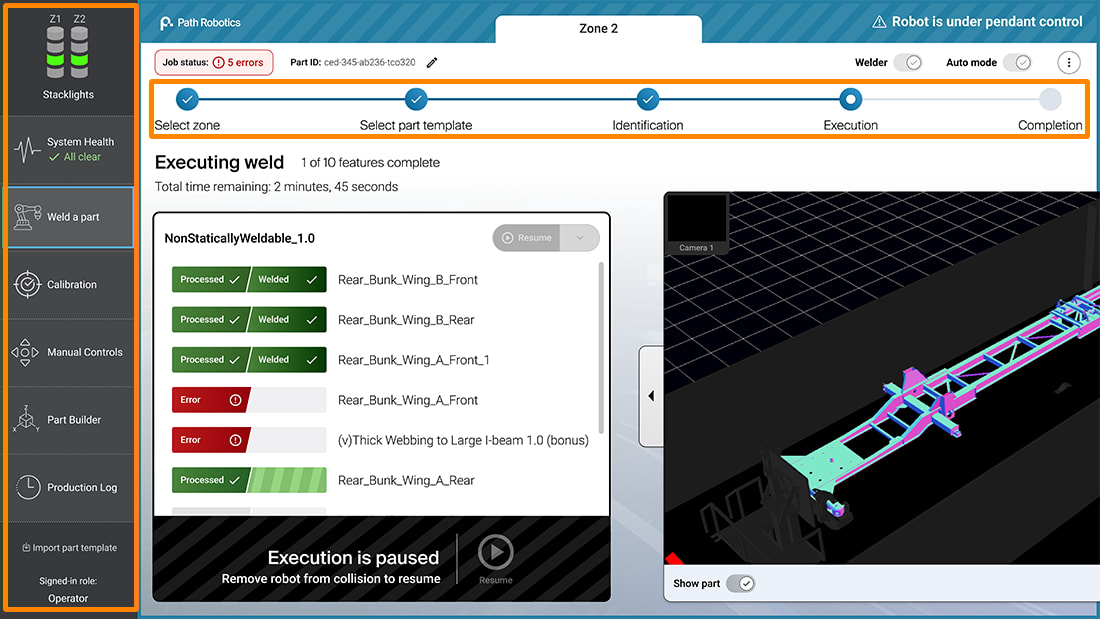
We created a tool which would allow the operator to quickly and easily navigate. The interface also allows the operator to know exactly what phase of a job and when it will be completed.
- A job progression wizard keeps the operator in-the-know of the current job
- Persistent navigation allows the operator to quickly and easily get to where they need to go
solution
User Testing
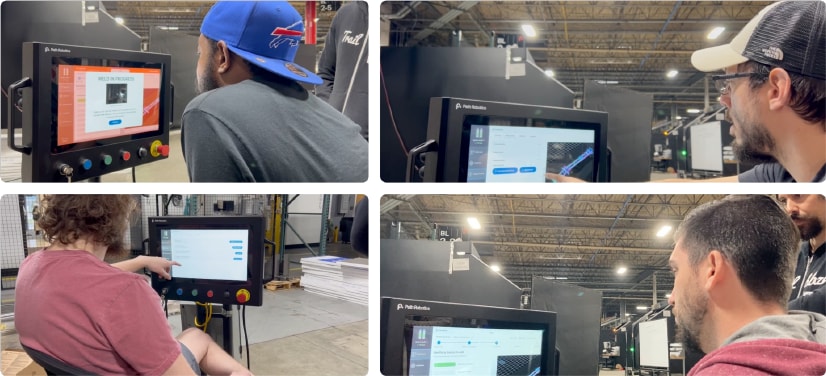
User testing with real operators ensured the interface was shaped around actual workflows rather than assumptions, leading to a more intuitive and efficient experience. By observing how users naturally interacted with the system, I was able to identify friction points early, validate design decisions, and refine the UI to better match operator expectations. This directly supported the goal of reducing training time and improving overall usability.
The Outcome
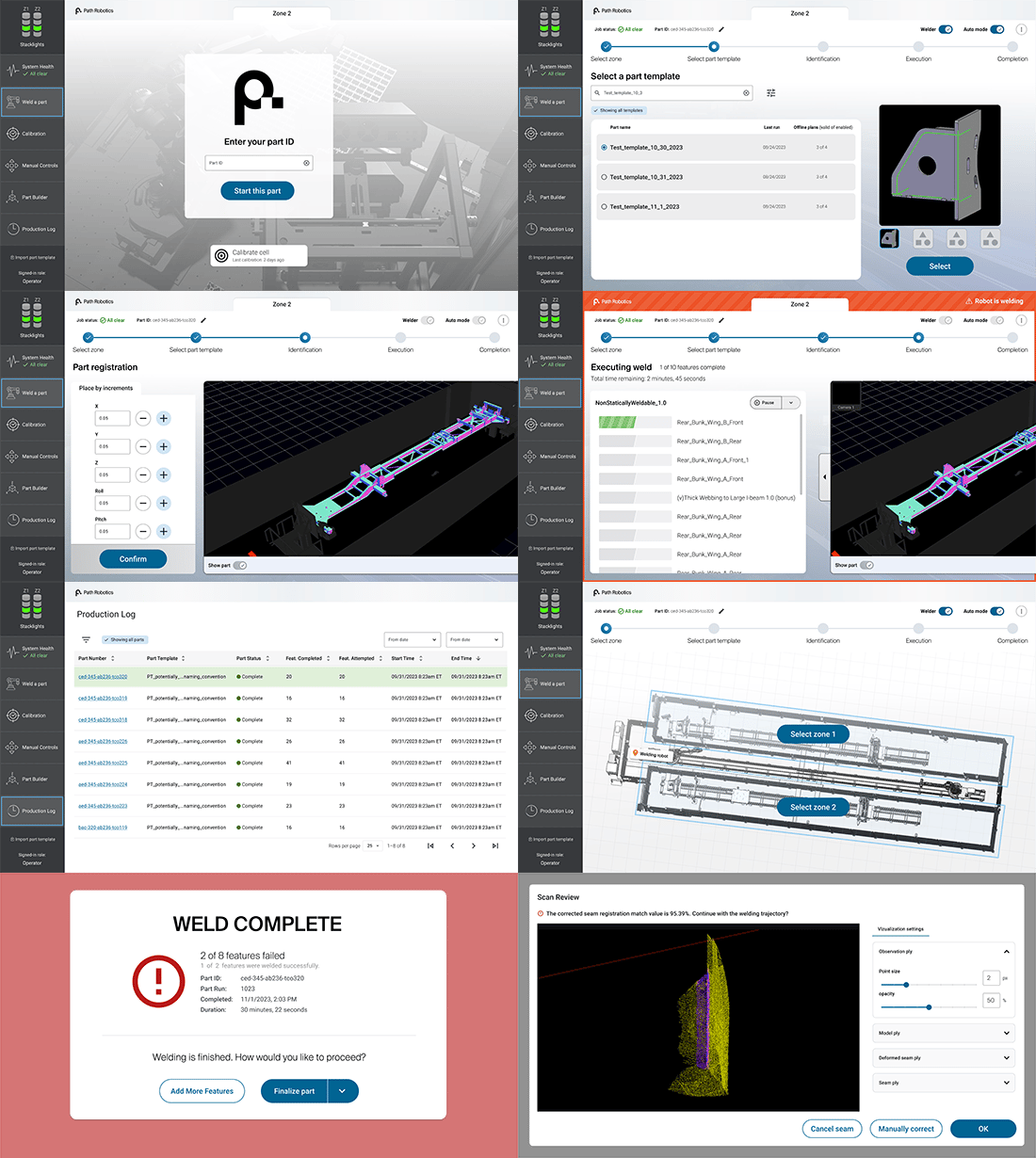
The finished product was an accessible, easy to use, and responsive user interface.
Each screen displays the most important details needed for the operator.
More project work


Ben Rondot | Consultant Portfolio
industrial robotics company
Human machine interface re-design
About
Create a user interface that is intuitive and reduces initial operator training.
Role
Senior user interface designer.
Skills
Information architecture, accessibility, branding, and high-fidelity mockups.

Problem
The initial design of the human-machine interface (HMI) was to provide a straightforward touch-based system that enabled the operator to initiate tasks, leave the workstation, and come back upon completion.
However, as the tool's functionalities grew, the foundational objective was lost. Training duration to master the interface has surged to the point where it necessitates advanced engineers for operation. There was a pressing need to develop a user interface that is user-friendly and diminishes the need for extensive initial training.
Before
Solution
The platform features an intuitive user interface designed to minimize the need for extensive operator training and streamline ramp-up processes, effectively reducing reliance on legacy systems. With touch-enabled functionality and an accessible, all-inclusive design, the interface ensures ease of use for a wide range of users. Additionally, the tool is built to be both expandable and scalable, accommodating future growth and evolving operational needs.
After
solution
Design System Creation
Creating a design system provided a consistent and scalable foundation for the human machine interface, ensuring that all UI elements followed clear standards and patterns. This consistency made the interface more predictable for operators, reinforcing usability and reducing cognitive load. It also streamlined collaboration between design and development, enabling faster iteration and more efficient implementation while maintaining a high level of quality across the system.
solution
Improved Navigation
We created a tool which would allow the operator to quickly and easily navigate. The interface also allows the operator to know exactly what phase of a job and when it will be completed.
- A job progression wizard keeps the operator in-the-know of the current job
- Persistent navigation allows the operator to quickly and easily get to where they need to go
solution
User Testing
User testing with real operators ensured the interface was shaped around actual workflows rather than assumptions, leading to a more intuitive and efficient experience. By observing how users naturally interacted with the system, I was able to identify friction points early, validate design decisions, and refine the UI to better match operator expectations. This directly supported the goal of reducing training time and improving overall usability.
The Outcome
The finished product was an accessible, easy to use, and responsive user interface.
Each screen displays the most important details needed for the operator.
More project work
Ben Rondot | Consultant Portfolio
industrial robotics company
Human machine interface re-design
About
Create a user interface that is intuitive and reduces initial operator training.
Role
Senior user interface designer.
Skills
Information architecture, accessibility, branding, and high-fidelity mockups.

Problem
The initial design of the human-machine interface (HMI) was to provide a straightforward touch-based system that enabled the operator to initiate tasks, leave the workstation, and come back upon completion.
However, as the tool's functionalities grew, the foundational objective was lost. Training duration to master the interface has surged to the point where it necessitates advanced engineers for operation. There was a pressing need to develop a user interface that is user-friendly and diminishes the need for extensive initial training.
Before
Solution
The platform features an intuitive user interface designed to minimize the need for extensive operator training and streamline ramp-up processes, effectively reducing reliance on legacy systems. With touch-enabled functionality and an accessible, all-inclusive design, the interface ensures ease of use for a wide range of users. Additionally, the tool is built to be both expandable and scalable, accommodating future growth and evolving operational needs.
After
solution
Design System Creation
Creating a design system provided a consistent and scalable foundation for the human machine interface, ensuring that all UI elements followed clear standards and patterns. This consistency made the interface more predictable for operators, reinforcing usability and reducing cognitive load. It also streamlined collaboration between design and development, enabling faster iteration and more efficient implementation while maintaining a high level of quality across the system.
solution
Improved Navigation
We created a tool which would allow the operator to quickly and easily navigate. The interface also allows the operator to know exactly what phase of a job and when it will be completed.
- A job progression wizard keeps the operator in-the-know of the current job
- Persistent navigation allows the operator to quickly and easily get to where they need to go
solution
User Testing
User testing with real operators ensured the interface was shaped around actual workflows rather than assumptions, leading to a more intuitive and efficient experience. By observing how users naturally interacted with the system, I was able to identify friction points early, validate design decisions, and refine the UI to better match operator expectations. This directly supported the goal of reducing training time and improving overall usability.
The Outcome
The finished product was an accessible, easy to use, and responsive user interface.
Each screen displays the most important details needed for the operator.